How to add dark mode to a Figma website
Add dark mode to a Figma website with light and dark variable modes: it follows the visitor’s system setting, with an optional toggle.
Last updated
Dark mode needs two Figma variable modes named light and dark. Several modes in a collection are available on Figma’s Professional plan and above: see Figma’s pricing.
Design with light and dark variables
Use variables for everything that changes between light and dark: colors, images, icons… figma.to.website looks for a collection with two modes named exactly light and dark. Design in either mode.
On the published site, figma.to.website follows the visitor’s preference, as set in their browser or operating system, and uses the light or dark values.
Add a light/dark switch
To let visitors toggle the theme:
-
Add a text variable to the collection to control which variant of the switch shows. Name it as you like — say
theme— with the valuelightin the light mode anddarkin the dark mode. -
Create a switch component with two variants,
lightanddark. Give each an On click → Set variable mode interaction. Here, the sun variant sets the collection tolight, and the moon variant sets it todark: clicking the sun turns on light mode, and the moon dark mode.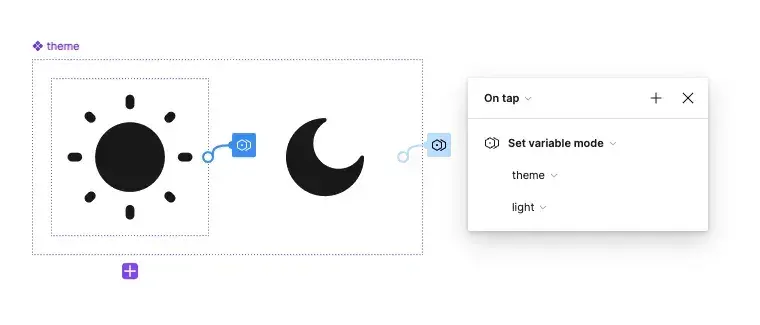
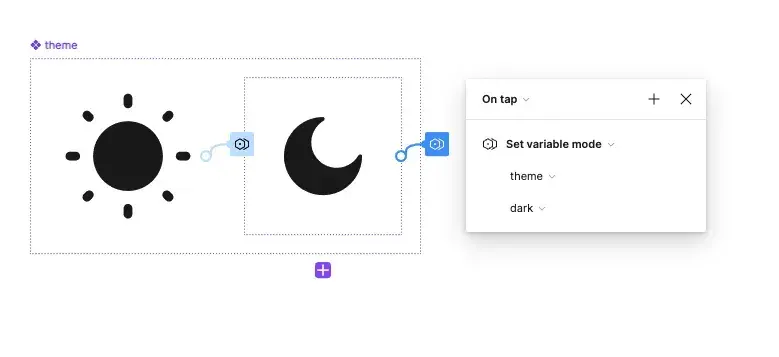
-
Place an instance of the switch on your page.
-
Bind the variant to the theme: with the instance selected, click the Assign variable icon next to its variant property, and pick the
themevariable.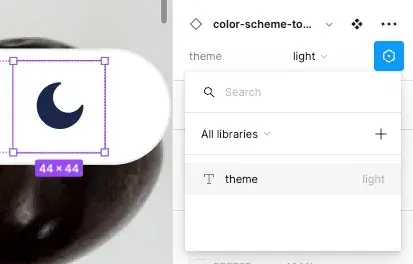
That’s it: publish your site, and visitors can switch between light and dark.