
Introducing ‹div›RIOTS ONE
-

- Name
- Ardena
- @ardena_gonzalez
Today, the ‹div›RIOTS catalog covers 20+ plugins, three web tools, two APIs, and a browser extension. Together, they handle 40+ file formats and cover the full arc from importing raw files to publishing finished designs as live websites.
Along the way, subscribing to the full ecosystem meant managing a handful of separate plans — one for html.to.design, one for the import plugins, a separate relationship for API access. We took a first step toward fixing that last year with our import bundle, which grouped all our file conversion plugins together. Today we’re replacing it with something that covers everything.
‹div›RIOTS ONE is a single subscription that covers (nearly) everything we make: our Figma plugins*, web services, and one of our APIs. If you’ve been using more than one ‹div›RIOTS product, this is for you.
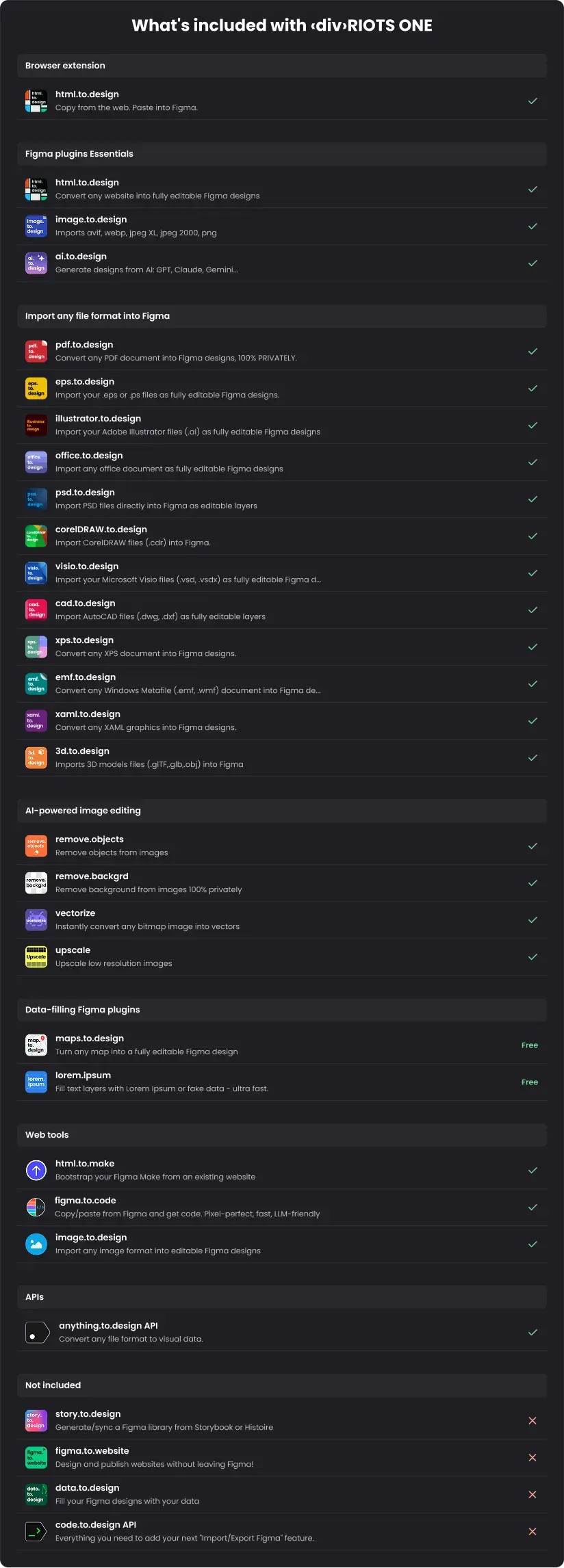
*The plugins story.to.design, data.to.design and figma.to.website are not currently included in ‹div›RIOTS ONE.
What’s included in ‹div›RIOTS ONE?
html.to.design — convert any web page into editable Figma layers
html.to.design is where it all started. The plugin — and the Chrome extension that comes with it — converts any live web page into fully editable Figma designs. Capture full pages, sections behind a login, internal tools, or AI-generated UI, and paste directly onto the canvas. No screenshots. No rebuilding from scratch.
Import any file format into Figma
This is the suite that grew out of html.to.design’s success — a set of plugins that cover 40+ file formats so you’re never blocked by what you’ve been handed.
pdf.to.design imports any PDF document into Figma as editable layers or static images — including exports from Canva, InDesign, and any other PDF-based tool.
psd.to.design converts Adobe Photoshop .psd and .psb files into Figma with layer structure, text layers, shapes, and styles preserved.
illustrator.to.design brings .ai artboards straight into Figma as editable layers, no export workarounds needed.
office.to.design handles the whole Office stack: PowerPoint, Word, Keynote, Pages, OpenOffice — all imported as editable Figma designs.
image.to.design converts any flat image or screenshot into fully editable Figma layers. Plus, it supports a wider variety of image formats than can be natively imported by Figma.
eps.to.design, corelDRAW.to.design, cad.to.design, visio.to.design, xps.to.design, emf.to.design, xaml.to.design, 3d.to.design — all included. If a client sends something obscure, chances are we import it.
ai.to.design — generate Figma designs from a prompt
ai.to.design generates designs directly on your Figma canvas from a text prompt. It’s one of the latest additions to the core toolkit, and it’s part of ONE.
Image editing: remove, upscale, vectorize
ONE also covers our image utility plugins: remove.objects, remove.background, upscale, and vectorize. All run locally inside Figma, with no data leaving your machine.
Web Services
Four browser-based services are included in ONE.
anything.to.design is a web service that converts any file format to precise HTML or Figma design. It’s also available as an API - see below.
image.to.design is our newest web service that takes screenshots and images and converts them into Figma designs or HTML code you can copy or download, straight in the browser. It’s also available as an API in anything.to.design API.
figma.to.code goes the other direction: paste any Figma frame and get production-ready HTML code back in seconds. It’s available as a API in code.to.design API.
html.to.make is built for Figma Make — paste any URL and it downloads the site as a ready-to-use Figma Make project, so you’re never starting from a blank canvas. This is also available as an API in anything.to.design API.
The API
This is the part that makes ONE different from any plugin bundle.
The anything.to.design API converts PDF, PSD, AI, and other file formats to Figma clipboard data, JSON, or other structured output — the backend layer that powers our plugins, available directly to developers or agents.
This API is automatically included in ONE. No separate developer plan, no second billing relationship.
ℹ️ We hope to be able to add the code.to.design API to ONE in the future, but for now it remains a separate subscription.
Get ‹div›RIOTS ONE
Visit divriots.com/one to subscribe. Then install any ‹div›RIOTS plugin and sign in with your ONE account to unlock your subscription. API credentials come through your account dashboard.
We’ve been building toward this for a while — a single place to access everything ‹div›RIOTS makes, with the guarantee that whatever we ship next is already included. If you’ve got questions, feedback, or something you’d like to see us build next, we’d love to hear from you.
ℹ️ Our plugins story.to.design, figma.to.website and data.to.design are not currently included in the ‹div›RIOTS ONE subscription.